

The most common advice about Sportsnet IPTV is also the most misleading. You're told to check that Sportsnet is on the channel list, count the channels, and buy the cheapest long plan. That tells you almost nothing about whether your team's next game will play.
Sportsnet isn't one channel. It's regional feeds, national feeds, and rights that change by province, club, and game type. A lineup can list Sportsnet and still miss your home-market broadcast, show replacement programming during a blackout, or freeze during the first period because your household ran out of sustained speed. I would start with your province and your club, not the channel count.
Table of Contents
- Which Sportsnet Feeds an IPTV Lineup Needs
- NHL Blackouts an IPTV Listing Does Not Remove
- Speeds and Routing That Keep Live Games Smooth
- What Sportsnet Costs Once Rights Are Split
- How to Test a Service on Your Own TV
- Live Sports and PPV Coverage Check
- Start With a Trial for Your Team
Which Sportsnet Feeds an IPTV Lineup Needs
Start with this lookup. Find your province, match it to one regional feed, then confirm Sportsnet ONE is also listed.
Sportsnet feeds and who they serve
| Feed | Region | Typical sports role | What to verify |
|---|---|---|---|
| Sportsnet Pacific | British Columbia and Yukon | Canucks and other regional live sport | Feed matches BC or Yukon, not a generic Sportsnet label |
| Sportsnet West | Prairies and northern territories | Flames, Oilers and other Prairie sport | Feed matches the viewer's province |
| Sportsnet Ontario | Most of Ontario | Maple Leafs and other Ontario sport | Feed is Ontario, not East, for most of the province |
| Sportsnet East | Eastern Ontario, Quebec and Atlantic Canada | Regional sport for the East | Feed is East rather than Ontario |
| Sportsnet ONE | National | National NHL and other sports windows | Present in addition to the regional feed |
| Sportsnet 360 | National | Highlights, replays and some live events | Not treated as full regional game coverage |
| Sportsnet World | National | Soccer and international sport | Separate from NHL regional rights |
Read the regional rows first
If you're in British Columbia or Yukon, Sportsnet Pacific is your regional feed and the Canucks territory that matters. Prairie and northern viewers need Sportsnet West for Flames and Oilers territory. Most of Ontario needs Sportsnet Ontario, while Eastern Ontario, Quebec, and Atlantic Canada fall under Sportsnet East.
That split isn't a marketing detail. The Sportsnet 10-year timeline notes the network launched on October 9, 1998 as a regional sports network, and its current structure still separates Pacific, West, Ontario, and East alongside national services such as ONE, 360, and World. Sportsnet was built as regional feeds rather than one national channel, which is why the table is split.
Then check the national feeds
Sportsnet ONE carries many national NHL and other sports windows, so a regional feed without ONE leaves a gap. Sportsnet 360 mixes live events, highlights, and replays. Don't count it as a substitute for regional game coverage. Sportsnet World carries soccer and international sport under separate rights, so it doesn't solve an NHL problem.
A lineup that shows only a generic Sportsnet name tells you nothing about which games play in your province.
Run two checks before you look at anything else. First, the feed name must match your province or territory. Second, ONE must sit beside that regional feed. You can compare those names against the Canadian IPTV channels list rather than trusting a sales page summary. If either check fails, the rest of the list doesn't fix it.
NHL Blackouts an IPTV Listing Does Not Remove
Broadcast rights decide what plays, not the channel guide. A lineup can carry every Sportsnet feed and still leave you watching replacement programming on the night your club plays at home, because blackouts attach to the game and your location rather than the feed name.
The table below sets a channel listing against what broadcasting rules still control.
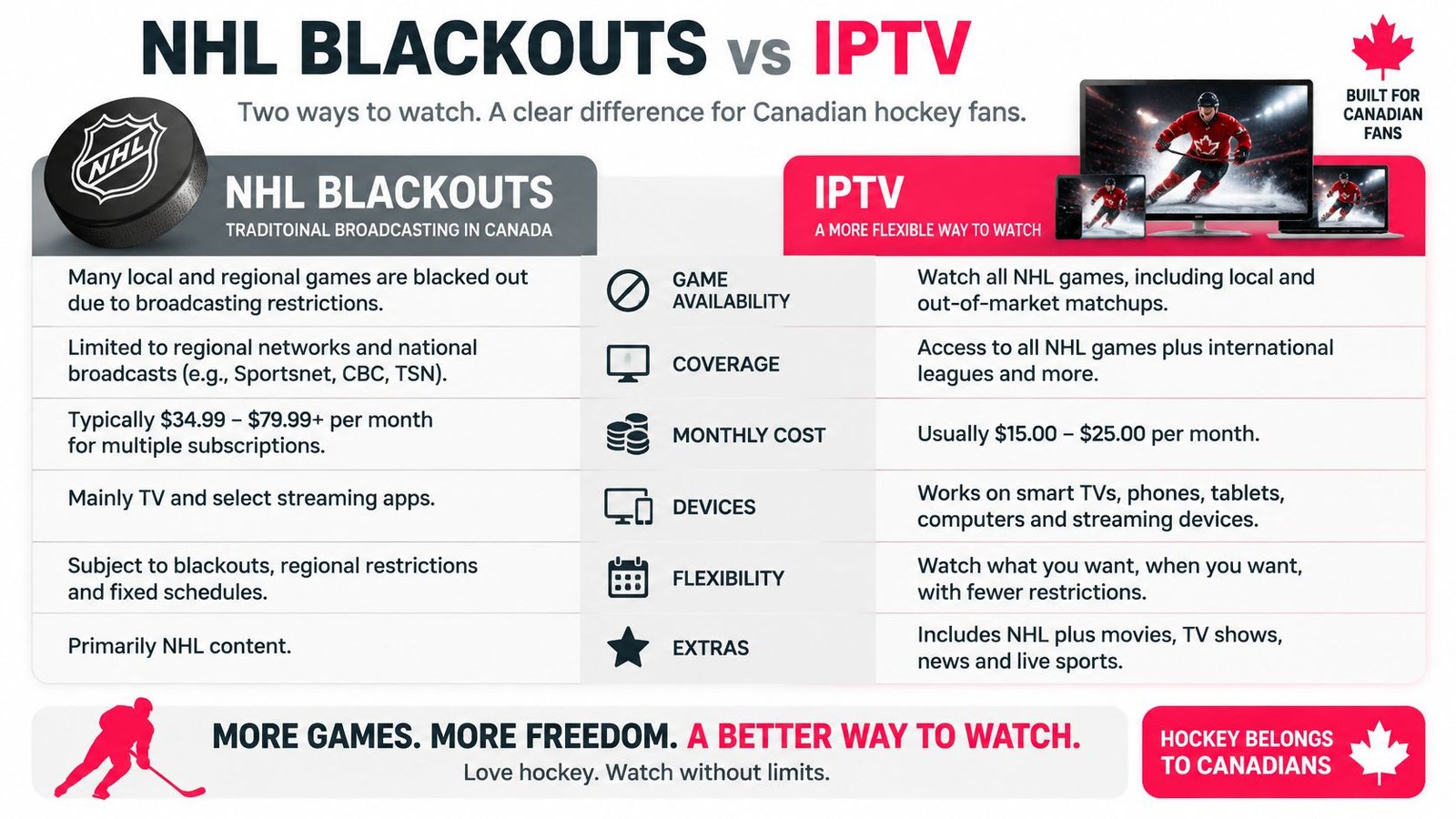
The Sportsnet frequently asked questions state that regional NHL blackouts still apply to its streaming service, affecting markets including the Maple Leafs, Flames, Oilers, and Canucks, and that for 2026-27 the network is removing 150 regional blackouts while other games stay restricted. Availability can depend on the viewer's location, television subscription, and the rights attached to a particular program. Attempts to circumvent blackout restrictions can result in cancellation, so don't treat any workaround as a feature.
Access limits by NHL club and game type
| Case | Access limit | What to check |
|---|---|---|
| Maple Leafs (Sportsnet Ontario) | In-market blackouts can still apply | Confirm the game is cleared for your Ontario zone |
| Flames and Oilers (Sportsnet West) | In-market blackouts can still apply | Confirm your Prairie zone and province |
| Canucks (Sportsnet Pacific) | In-market blackouts can still apply | Confirm your BC or Yukon zone |
| National windows (Sportsnet ONE) | More reliable than a home-market game when cleared | Confirm the game is in the national window |
| 2026-27 blackout change | 150 regional blackouts removed; other games stay restricted | Check each game, not the season |
Where the boundary catches people
Territory boundaries vary by province and by specific regional zones. If you live near a border, don't assume the neighbouring feed covers you. Check your own zone for the club you follow, because a postal code on the wrong side of a line can change what plays.
Nationally cleared games behave differently. When a game sits in a national window, Sportsnet ONE is more likely to carry it across regions. Out-of-market games can also clear where your local club's home broadcast does not. The risk is highest for the game you care about most: your in-market team at home.
The announced removal widens access, but it doesn't clear the schedule. Some programs are not available online at all because the digital rights were never granted, so a feed that exists on cable can still be missing from a stream on a given night.
The one-game test
Pick two fixtures before you pay: the next home game of your local club and the next national window. Ask which exact feed carries each one for your zone, and what plays instead if a game is blacked out.
A seller who can answer with a feed name and a zone has done the homework. The risk is not buffering on game night. It is paying for a lineup that was never cleared to show you the games you bought it for.
Speeds and Routing That Keep Live Games Smooth
Sustained speed per stream is what decides whether a game holds on your screen. Start with the table, then run the math for a real game night.
Sustained speed per Sportsnet-style stream
| Picture | Sustained downstream | Household example |
|---|---|---|
| SD | 3-4 Mbps | One phone or older TV |
| HD | 5-8 Mbps | One typical live hockey stream |
| 4K UHD | 25 Mbps | One 4K stream, CRTC minimum downstream |
| Two 4K streams | About 50 Mbps | Two TVs at once |
The CRTC mobile and broadband report identifies 25 Mbps as the minimum downstream rate for 4K streaming and 5-8 Mbps as the range associated with HD video, while SD streams typically run around 3-4 Mbps per active stream on an adaptive-bitrate ladder. Two simultaneous 4K streams can require roughly 50 Mbps before other traffic, Wi-Fi overhead, protocol inefficiency, or bitrate peaks.
Do the household math for a busy night
A plan can look fast at noon and still fail at 7 p.m. One TV runs a 4K game, a second screen runs HD, someone joins a video call, and a console downloads an update. That stacks 25 Mbps, another 5-8 Mbps, and competing traffic on the same connection. A single afternoon speed test proves nothing about capacity during a playoff period.
I would plan from the busiest realistic night. Count every active stream, then leave headroom for peaks. If two 4K TVs already need about 50 Mbps sustained, a plan that only touches that number on a good test will dip below it under load.
Providers should state simultaneous-device limits clearly. For sports viewing, that limit sets the ceiling on how many streams your household can run before picture quality or access gives way.
Latency isn't the main failure
Latency below 100 ms is a useful target for responsive menus and interactive services. Live playback usually fails for a different reason. Throughput dips, delivery varies, the buffer drains, and the picture stalls.
That's why a good ping result can sit beside a bad game. Sustained throughput and low variation in delivery rate matter more directly to uninterrupted playback. Rapid bitrate switching helps because the player can step down from 4K to HD, or from HD toward lower rungs, and keep the game moving instead of freezing on the top rung.
Practical rule: A picture that drops to HD and keeps playing beats a 4K picture that stalls between whistles.
Watch for symptoms you can see without a network tool. A slow start points to a long wait for the first segment. Repeated brief freezes suggest segment downloads are arriving unevenly. A buffer that empties late in a period often means the path couldn't sustain the chosen rung, even if a speed test looked fine earlier.
Routing sets the ceiling
Your home line is only part of the path. The CIRA report on Canada's internet found that much Canadian-originating traffic routes through U.S. exchange points even when the destination sits in Canada, adding routing distance and exposure to cross-border congestion or failures. A healthy home connection can still jitter on a national game night if segments take a long, crowded route.
That causal chain is simple. Congested or indirect routes increase segment-fetch variance. Variance drains the playback buffer. An empty buffer stalls the picture, and peak-event concurrency makes every step worse because thousands of viewers request the same live segments at once.
Canadian peering, regional caches, and delivery close to viewers reduce round-trip delay and improve segment-fetch reliability. Alternate origins for marquee events give the player somewhere else to go when one path degrades. Short media segments with rapid failover also help, because the player recovers in smaller steps.
We host our servers locally, which cuts out the middleman, and our premium servers are Canadian-optimized to prevent buffering. That design choice addresses routing distance, but it doesn't remove the need to test your own home path during a busy game.
Test like it's game night
Test on the TV you use most often. Try Wi-Fi first if that's your normal setup, then Ethernet if the TV sits near the router. Run one other device at the same time, because a solo test hides concurrency problems.
Compare two sessions on the same channel. Watch a quiet-afternoon replay, then watch first-period live action. If the replay is clean and only the live game fails, suspect event concurrency and route variance rather than your TV. If HD already stutters alone, a second stream won't help until the path or the rendition ladder changes.
Note three things during the test:
- Start time: Does the first picture appear promptly, or does the player sit loading?
- Stability through motion: Does high-motion play hold, or does it freeze and recover?
- Recovery: When quality drops, does it step down smoothly or stall outright?
If you need a structured fix sequence for those symptoms, work through the guide to fixing IPTV freezing and buffering before you blame the channel. Measure what matters where you can, including rebuffering and segment-download variance, and judge the service by a busy live window. That's the only test that resembles the night you're paying for.
What Sportsnet Costs Once Rights Are Split
Stop comparing one IPTV price against one cable bill. Price the viewing profile you have, starting with the official streaming tiers.
The Sportsnet+ pricing page lists Standard at $34.99 CAD monthly or $269.99 annually, and Premium at $44.99 monthly or $344.99 annually. Sportsnet also says some programming may be unavailable online because it lacks the relevant digital rights, and blackout rules can apply. Neither tier guarantees every desired game.
The cost split below shows why one subscription rarely ends the calculation.

Official sports access versus a split viewing profile
| Option | Published cost | What it covers | Gap |
|---|---|---|---|
| Sportsnet Plus Standard | $34.99 CAD monthly or $269.99 yearly | Official Sportsnet streaming tier | Blackouts and missing digital rights can still apply |
| Sportsnet Plus Premium | $44.99 CAD monthly or $344.99 yearly | Higher official tier | Still not a guarantee of every desired game |
| Traditional TV sports package | Set by provider and contract term | Regional Sportsnet when the package includes it | Long commitment and hardware or rental fees |
| IPTV sports lineup | Confirm the current CAD price; do not assume a saving | Many live channels if the feed is carried | Channel count is not the same as cleared games |
| Stacked legal profile | Often more than one subscription per year | Regional NHL plus TSN rights plus Amazon-exclusive games | Total set by team, province and schedule |
Two profiles, two answers
Take an Ontario Leafs viewer who wants home games, national windows, and the occasional basketball or soccer night. That profile crosses regional rights, national windows, and other properties. A fan who also needs TSN-held rights or an Amazon-exclusive game ends up stacking subscriptions, with internet and device costs on top. Judge that profile by whether the specific Leafs home games appear, not by channel count.
A viewer outside those four in-market clubs who mainly wants national games has an easier path. National windows carry more of the load, so fewer services can cover that profile well. The same lineup can be good value for this viewer and poor value for the Leafs household. Team, province, and schedule decide.
That stacking is now normal. The Canadian Radio-television and Telecommunications Commission has reported that online services reach more Canadian adults than traditional broadcasting distribution subscriptions do. Households already assemble entertainment from several subscriptions instead of buying one bundle.
Total the games you need, then compare prices.
Confirm the current CAD price of any IPTV lineup, add the other services your profile still needs, and total a full year. Watching IPTV, for example, sells plans of 1, 3, 6, or 12 months across 1 to 5 devices, and its free 24-hour trial includes full HD channel access with no credit card required, so the monthly line item is easy to pin down before you commit. If uninterrupted official access to one club matters most, that priority should drive the purchase. If national windows are enough, you can reasonably pay for less.
How to Test a Service on Your Own TV
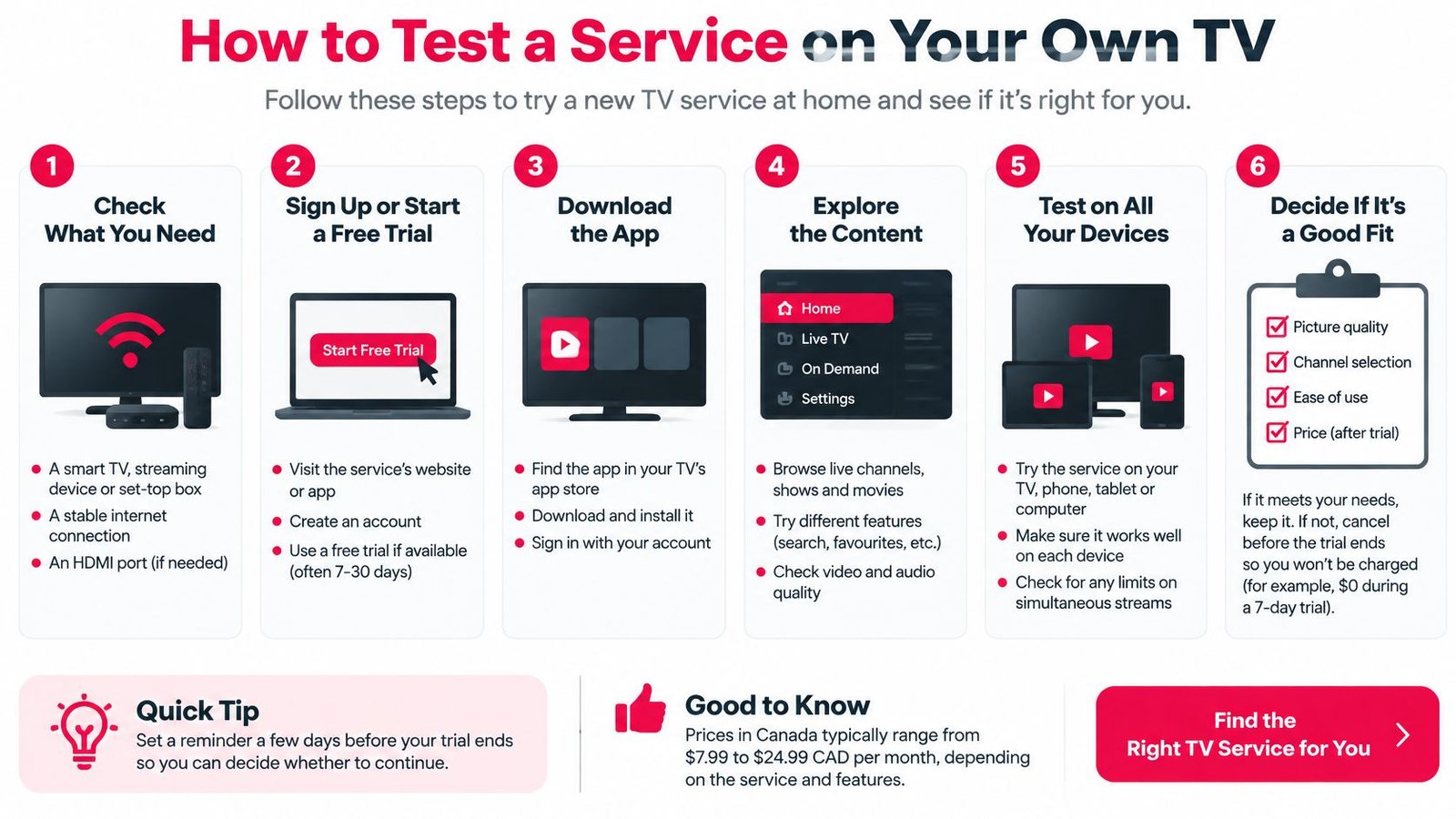
Run one evening test in this order. Skip the movie library and the menu speed, because neither proves a live game will work.
The checklist below condenses the sequence into six visual steps.
The eight checks
- Name the target first: Write down your club, your province, and whether the next meaningful game is a home game or a national window.
- Apply the feed rule: Use the lineup check from the feeds section above. Your matching regional feed has to be there, and one Sportsnet name on the list is not enough.
- Check the guide against reality: Confirm the next game's title, start time, and channel match a published schedule. We provide a clean and accurate EPG, and you should still verify the listing that matters.
- Confirm a backup exists: Make sure a second source carries the same sports network, so one failed stream doesn't cost the whole night. We provide multiple TSN/Sportsnet backup channels for that reason.
- Test the main TV: Note the simultaneous-device limit, then use the television your household will watch, wired or on a strong 5 GHz signal near the router.
- Measure on that device: Run a speed test on the TV itself and compare the sustained result with an HD game's needs, then with a single 4K stream if that's your target.
- Watch live play: Stay through a period change or a high-motion sequence. Menus and studio segments hide problems that fast play exposes.
- Check the seller's rights language: Hold the pitch to the blackout standard from earlier. Feeds and zones named, with no all-games promise in place of detail.
When to stop early
Stop the test if the guide is empty for your game. Stop if your regional feed is missing. Stop if the only pitch is an all-games claim with no zone, feed, or rights detail behind it.
A failed test has a look of its own. The picture drops to a lower resolution during a rush, the audio slips out of sync with the play, or the stream freezes on a faceoff while the game goes on somewhere else. Any one of those on your own screen tells you the lineup can't carry the night you care about.
Live Sports and PPV Coverage Check
PPV events are sold per event, so check them separately from the monthly lineup. A strong regular sports list proves nothing about a specific fight or special event: it can still be missing, priced in another currency, or restricted in your province.
- Find the event by name in the guide, under its own title, date, and start time instead of a generic channel label.
- Classify the broadcast: national window, regional feed, or rights-restricted showing. Blackout and missing digital rights limits still apply.
- Get the full price in CAD, what the purchase includes, and whether a replay comes with it, before you pay.
- Check when the event feed opens. PPV streams often go live only near the start time, so watch the preliminary portion before the main card begins.
- Confirm the app runs on your device and the simultaneous-device limit covers everyone watching.
Take a Saturday MMA card as the worked case. The guide lists it by name, the start time matches the promoter's schedule, and the seller states a CAD price with a replay included. The feed opens ahead of the main card and holds HD through it. That purchase passes. A seller promising "all PPV" with no named event, no price, and no replay terms has told you nothing.
Our own lineup includes sports and PPV channels covering hockey, football, and MMA, and the same check applies: verify the named event rather than assuming it's covered. Reject any seller that can't name the event, its start time, and its price before you pay.
Start With a Trial for Your Team
Make the decision around one game. If the next broadcast that matters is an in-market Leafs, Flames, Oilers, or Canucks game, pick the shortest term and verify that exact game before any multi-month plan. If you mainly want national windows, your test is Sportsnet ONE holding a stable HD picture, not a promise of home-market clearance.
We offer a free 24-hour trial with full access to HD channels, no credit card required, and you can review the current terms on the IPTV free trial for Canada page before you start. Confirm the trial length, card requirement, plan lengths, and channel list on our own pages at the time you sign up. Run the trial on the same TV and connection you plan to use, since a test on a phone over mobile data tells you nothing about your living-room setup.
Pass a game-night test on the 1 Month Premium IPTV plan first, then consider the 3 Months Premium IPTV plan for a longer run.
Test your exact Sportsnet feed, your club's next game, and a backup channel before you commit to a longer term. Visit Watching IPTV Canada to check the current trial, channel list, and plan options, then run your game-night test on the TV you'll use.
No Responses