

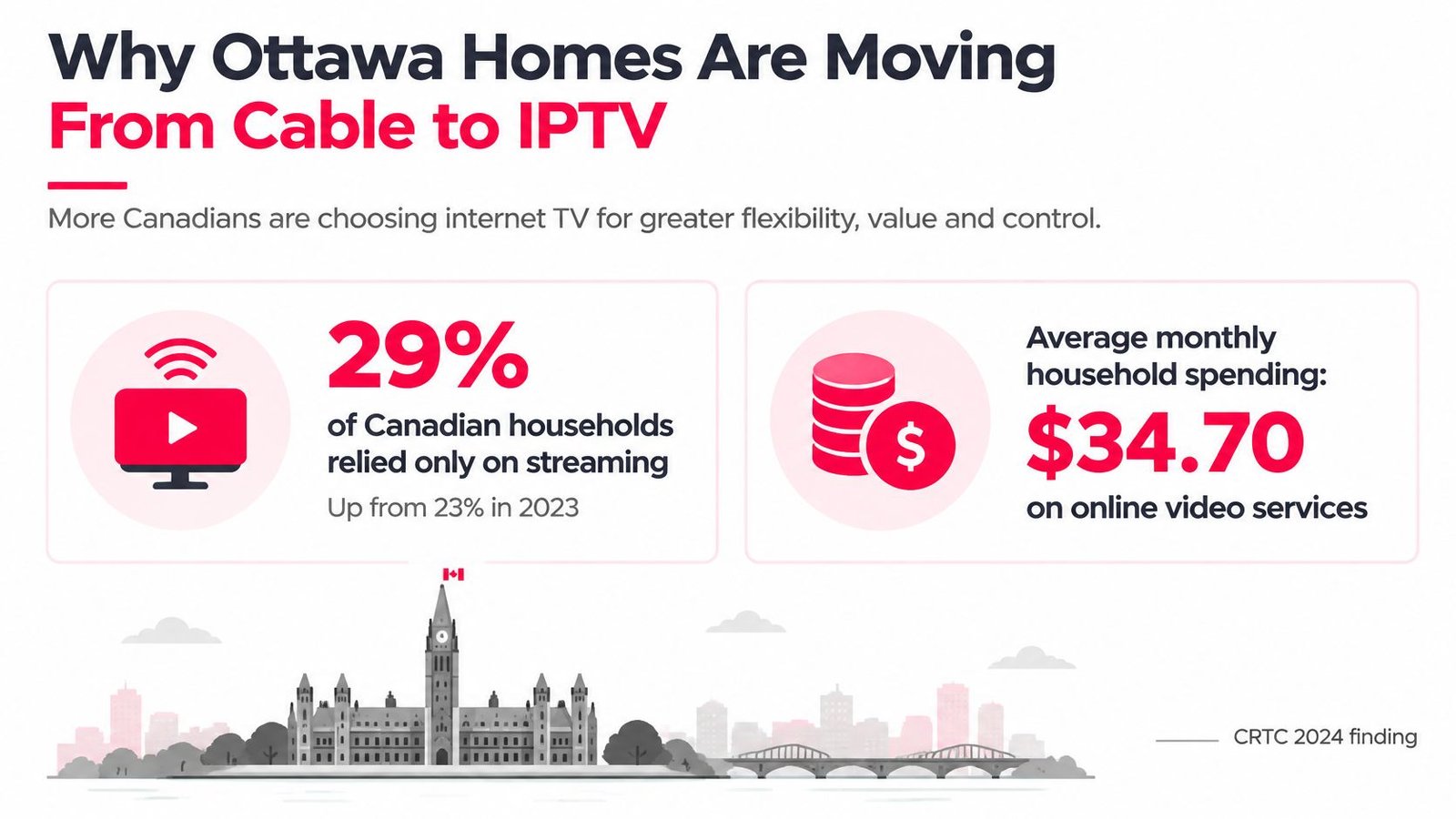
29% of Canadian households relied exclusively on streaming in 2024, up from 23% in 2023, according to the CRTC's 2024 Communications Monitoring Report. Those are national figures, not an Ottawa headcount, but they show why internet-delivered television deserves more than a comparison of channel totals.
For anyone comparing IPTV Ottawa options, the useful questions are practical: Will hockey stay watchable when the household connection is busy? Will the service work on your existing TV? Can the seller explain its distribution rights and refund terms before you pay?
Table of Contents
- Why Ottawa Homes Are Moving From Cable to IPTV
- Checks to Make Before You Pay for IPTV
- Is IPTV Legal in Canada and How to Verify a Seller
- Internet Conditions That Stop Buffering
- Sports Channels and On-Demand for Ottawa Viewers
- How to Set Up IPTV on Devices You Own
- Try a Short Plan You Can Leave
Why Ottawa Homes Are Moving From Cable to IPTV
Ottawa households buy television within the broader Canadian market. The CRTC report also puts average monthly household spending on online undertakings at $34.70, compared with $28.60 for broadcasting distribution undertakings such as cable and satellite. These are household spending categories, not prices for equivalent television packages, so they shouldn't be treated as a direct savings comparison.
The shift makes sense for people who want to watch on different screens rather than organise every room around a receiver. Still, replacing cable with internet television changes how the household depends on its broadband connection.
IPTV describes delivery, not a channel brand
Internet Protocol Television delivers television as data over an IP network. For an app-based subscription using your home internet, those packets share capacity with video calls, games, browser downloads and cloud backups.
Traditional cable and satellite television generally use a dedicated television delivery system and often a provider-supplied receiver. However, the boundary isn't just cable company versus streaming company: legitimate Canadian telecom providers can also use IPTV technology.
That distinction matters. The delivery method doesn't establish whether a particular subscription is authorised, nor does it tell you whether its app or infrastructure will perform well.
Live television and on-demand work differently
A subscription may combine different viewing experiences, but they shouldn't be judged as a single library.
- Live television follows a schedule. An electronic program guide, usually called an EPG, helps you find the current programme, browse categories and see what's next.
- On-demand viewing starts when you choose a title. You can usually pause and resume without following a broadcaster's timetable.
- Catch-up or recording features are separate capabilities. Don't assume a live channel automatically includes either one.
Say you switch on a hockey game halfway through. A live feed may only show the current play, while a supported catch-up feature might let you restart the broadcast. Opening a series episode from an on-demand library is a different task altogether.
A well-designed app may also use adaptive quality, switching between available picture-quality levels as connection conditions change. The trade-off is a softer picture rather than an immediate interruption, although not every channel or player supports the same behaviour.
A sharp picture during a quiet afternoon isn't proof that a live broadcast will remain stable during a busy evening.
The important decisions aren't how impressive the advertised library sounds. They're whether the evening connection can carry the viewing you want, whether your existing devices can play it properly, and whether you can evaluate the service without taking on an unnecessary commitment.
Checks to Make Before You Pay for IPTV
What to verify before an Ottawa IPTV subscription
| Check | What good looks like | Red flag |
|---|---|---|
| Evening connection | Low, consistent latency and minimal packet loss under normal household use | A download speed test only, or stalls during games |
| Access and wiring | Fibre or cable, with Ethernet to the main TV where practical | Weak Wi-Fi, or a constrained DSL line carrying several streams plus uploads |
| Devices already owned | Plays on the supported Smart TV, Fire TV, phone or laptop in the home | Requires an unfamiliar locked box |
| Live sports | Working alternative feeds for important networks such as TSN and Sportsnet | A single feed with no recovery option during a game |
| Trial and refund | A no-payment trial and written refund conditions | Payment demanded before any service evaluation |
| Seller transparency | Named company, complaint path and credible rights information | Anonymous seller or an unsupported regulatory approval claim |
| Simultaneous screens | Account permissions match the TVs actually used together | Screen-count promises without testing household capacity |
Test the connection under realistic conditions
For a measurable reference, the CRTC's fixed-broadband quality decision defines high-quality service using round-trip latency no greater than 50 milliseconds and packet loss no greater than 0.25% during weekday peak periods of 7–11 p.m. These are broadband quality benchmarks, not a guarantee that a particular IPTV source will work.
Latency measures how long a round trip takes. Packet loss measures how much transmitted data fails to arrive. A large download-speed result doesn't answer either question adequately.
Run the test where you'll watch, while the household is using its connection normally. Testing beside the router with other devices disconnected can hide the problem you're trying to uncover.
For access and wiring, treat fibre or cable as useful starting points rather than automatic passes. A wired television can avoid wireless interference, but it can't repair an overloaded internet connection or an unstable streaming source.
Verify the service rather than the sales page
Open the app on equipment you already own before buying a dedicated box. Check whether the remote works naturally, subtitles are accessible and channel changes complete without repeatedly restarting the player.
For sports, look beyond a network logo in a channel list. An alternative feed is useful only if you can find and play it when the main feed fails. A backup also doesn't establish that the seller has distribution rights.
For money and accountability, read the actual policy rather than a badge. The STAK TV guide to IPTV legality in Canada identifies provider identity, licensing transparency, complaint procedures and refund information as meaningful checks, while warning that regulatory visibility isn't proof of rights to every channel.
We publish terms of use, and our support team is based in Canada. Keep written answers to account and policy questions so you have something more reliable than a disappearing chat message.
Finally, test the screens your household will use together. An account's connection allowance and your home's ability to carry those connections are separate constraints.
Buying rule: Treat two unresolved red flags as a reason to stop, not as a reason to negotiate a longer subscription.
Is IPTV Legal in Canada and How to Verify a Seller
IPTV is a technology. Authorisation concerns the specific service and the programmes it distributes. A legitimate telecom television platform and an unauthorised channel reseller can both deliver video over IP networks.
Canadian copyright law protects the right to communicate copyrighted works to the public and addresses services intended primarily to enable infringement. Copyright rules are federal, so an Ottawa address doesn't create a municipal exception.
Check identity and rights separately
A recognisable company name helps establish accountability, but it doesn't prove content rights. Likewise, a polished player demonstrates that someone has built or configured an interface, not that broadcasters have authorised the catalogue.
Use this verification list before payment:
- Identify the legal entity. Find the business name behind the subscription, not just a social-media handle or messaging account.
- Examine distribution information. Look for an explanation of how the service is authorised to supply its advertised channels in Canada.
- Read the complaint and refund procedures. Confirm how to contact the seller, what information a complaint requires and which conditions affect refunds.
- Challenge approval claims. A claim of being CRTC approved shouldn't substitute for evidence of rights to the particular content offered.
Our guide to whether IPTV is legal in Canada provides further context for separating the delivery technology from a seller's authorisation.
Don't confuse access with permission
A channel opening successfully proves that you can receive a stream at that moment. It doesn't prove that the distributor has permission to supply it, that access will continue, or that your subscription includes every event shown in an advertisement.
Similarly, a low price or an enormous catalogue can't settle a rights question. If a seller answers a licensing enquiry only by repeating the channel count, the important question remains unanswered.
Enforcement generally focuses more directly on unauthorised distributors than ordinary viewers, but that's not a blanket assurance for customers. This is general information, not legal advice. For a specific copyright dispute or payment disagreement, consult a qualified professional.
Internet Conditions That Stop Buffering
A faster package doesn't fix every freeze. Your access technology, router, wireless link, household activity and the streaming source can each affect playback.
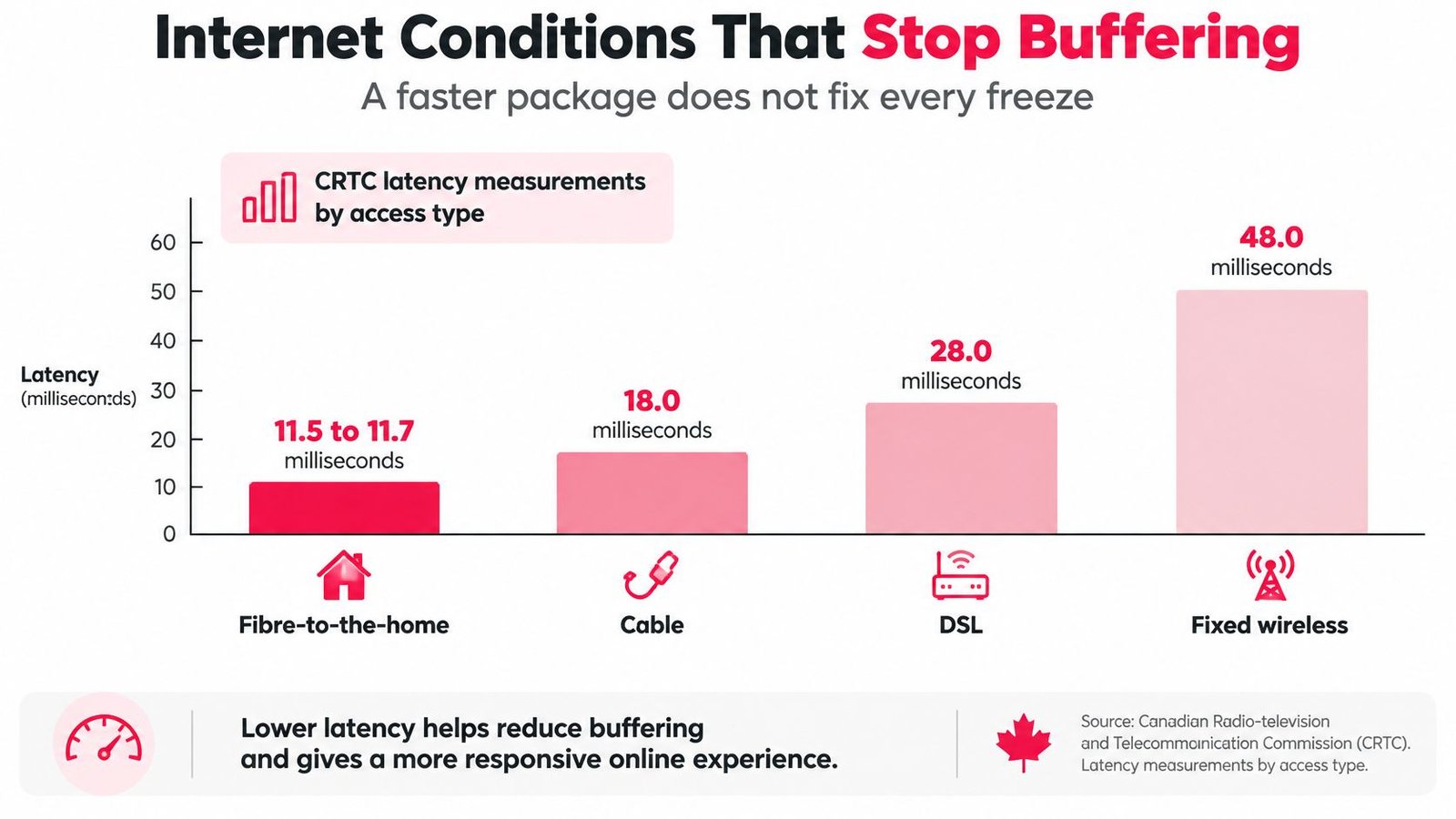
In CRTC broadband measurements, fibre-to-the-home averaged roughly 11.5–11.7 ms, cable/HFC 17.2–21.7 ms, and DSL 16.7–29.6 ms across measured speed tiers; central and eastern Canadian regions averaged about 15.2 ms and 27.1 ms, respectively.
Latency by Canadian access type
| Access | Measured round-trip latency | IPTV reading |
|---|---|---|
| Fibre to the home | 11.5–11.7 ms | A strong starting point, but still test the streaming route |
| Cable or HFC | 17.2–21.7 ms | Check evening consistency and the home network |
| DSL | 16.7–29.6 ms | Test available capacity before adding screens |
| Central Canada average | About 15.2 ms | A regional measurement, not an Ottawa address result |
| Eastern Canada average | About 27.1 ms | A reminder that regional results aren't interchangeable |
| High-quality bar | Peak-hour latency and loss benchmarks | Assess both measures, not download speed alone |
These are measured results, not current guarantees for every connection using those technologies. An Ottawa address still needs its own test.
Separate speed from household congestion
Mbps measures capacity, not the reliability of every part of a video session. There isn't a universal household speed requirement that accounts for every provider's encoding, picture quality and simultaneous activity.
Use the service's published stream requirements, then leave headroom for other work. HD generally needs less throughput than 4K, but selecting a higher-resolution label doesn't tell you the stream's actual bitrate.
Say a household is watching television while a laptop backs up photos and a console downloads a game. The router may queue traffic, increasing delay even though the internet package hasn't changed. Upload congestion can matter too, particularly during video calls or cloud synchronisation.
Diagnose before upgrading
Try Ethernet on the main viewing device first. If cabling isn't practical, use a strong 5 GHz or 6 GHz Wi-Fi connection where both the router and device support it, while recognising that walls and distance can weaken those bands.
Then change one condition at a time:
- Compare wired and wireless playback. If only wireless viewing fails, investigate placement, interference and signal strength.
- Pause heavy background activity. If playback improves when downloads or backups stop, manage household load before buying more speed.
- Compare different content sources. If a particular channel fails while other streams work, document that pattern for support.
- Check device behaviour. If menus lag and the player crashes, investigate the app and hardware rather than assuming the internet line is responsible.
Use a connection test that shows latency under load and packet loss, not just an attractive speedometer. Repeat it during the viewing conditions that cause trouble.
Our IPTV freezing and buffering troubleshooting guide can help organise those checks. Upgrade the broadband tier only when testing points to insufficient capacity, rather than weak Wi-Fi, a struggling player or a faulty source.
Sports Channels and On-Demand for Ottawa Viewers
In a 2024 CRTC study of 2,541 Canadians, 45% identified online video streaming as their primary entertainment source, compared with 42% for regular television, according to the CRTC public-opinion study. That's national context, not an Ottawa-specific audience measurement.
For a household choosing internet television, the important distinction is between having entertainment available and having the particular broadcast you want.
Build a viewing list around actual programmes
Start with the games, news programmes and series your household follows. A channel total won't tell you whether the right regional feed, language or event is included.
- Hockey viewing. Check the relevant TSN and Sportsnet feeds for the games you follow, including any regional restrictions.
- Other live sport. Identify the football, basketball and combat-sports events you expect to watch, rather than relying on a broad sports category.
- Pay-per-view. Confirm whether the particular event is included or requires a separate purchase. A PPV label isn't an event-by-event commitment.
- News and language preferences. Check Canadian news options and the international channels your household understands and watches.
Regional availability and event rights can complicate sports subscriptions. Our guide to where to watch live sports helps frame the viewing options, but verify the specific competition and broadcast before paying.
Judge the library and guide in use
For on-demand content, search for a series you want to watch and inspect its available seasons, episode order, audio and subtitles. A title appearing in search isn't enough if playback fails or episodes are missing.
The EPG is a daily usability test. Check whether programme names match the broadcast, local times make sense and search returns useful results. Favourite categories should shorten the route to a game, not bury it among near-duplicate entries.
A smaller usable selection is worth more than a vast list that doesn't contain the programme you came to watch.
Make your shortlist from real viewing tasks. That keeps an impressive catalogue from distracting you from missing content or poor navigation.
How to Set Up IPTV on Devices You Own
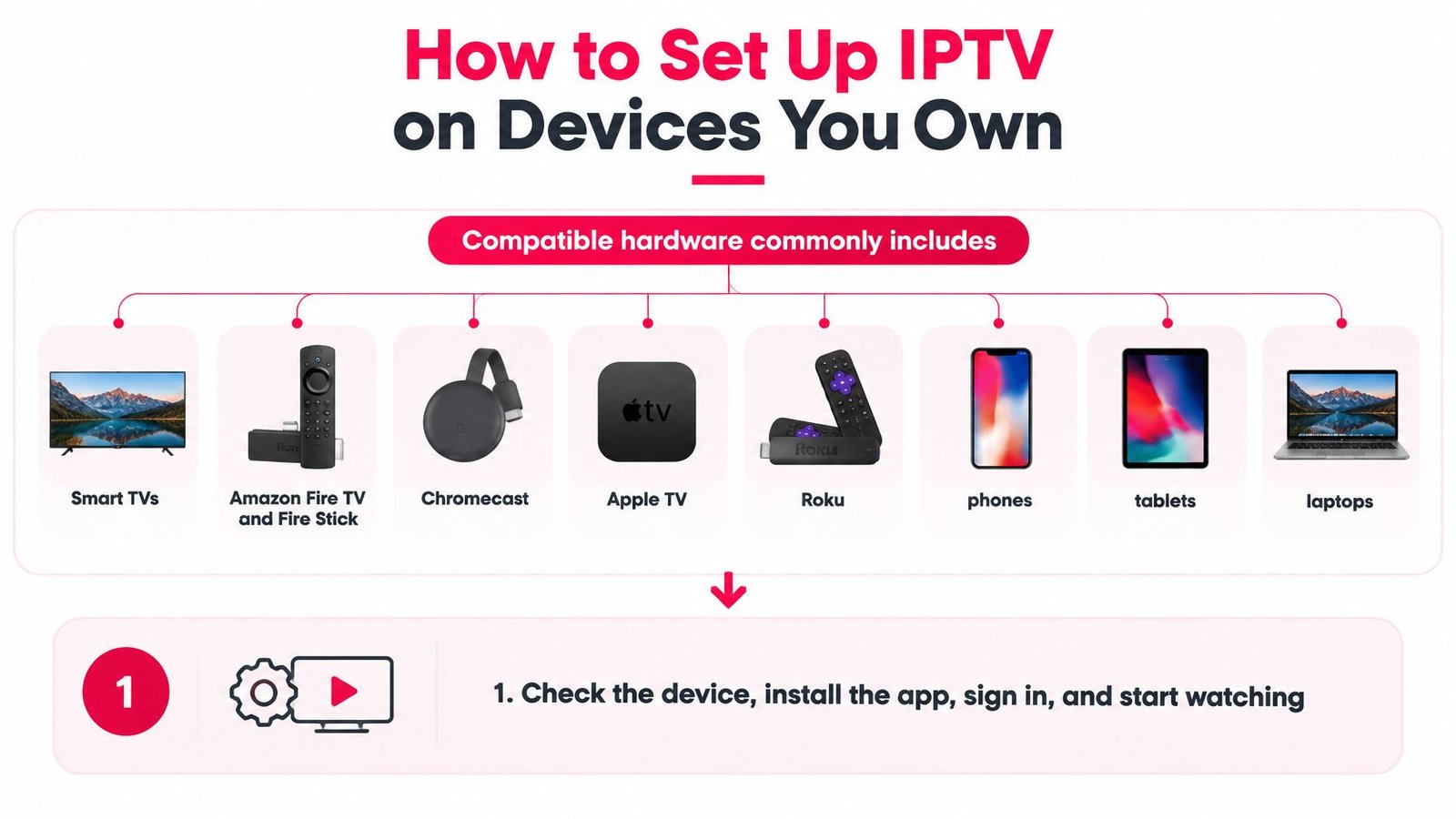
Start with the hardware already in the home. Depending on the service and app, supported options may include Smart TVs, Amazon Fire TV and Fire Stick, Chromecast, Apple TV, Roku, phones, tablets and laptops.
Compatibility isn't universal across those categories. A Smart TV's operating system and model matter, and a casting option isn't necessarily the same as a native app.
Follow a controlled installation path
Check the actual viewing device. Confirm its model appears in the supported-device instructions and run an evening connection test there where possible. A phone's result in another room doesn't describe the TV's wireless link.
Connect the main screen by Ethernet where practical. Use the TV's network settings to confirm the wired connection is active. Plugging in a cable without checking the selected connection can leave the device using Wi-Fi.
Install the recommended player from a trusted source. Prefer the official app store. If installation outside the store is required, verify the installer and publisher, limit the permission to that installer and disable it afterwards.
Enter the supplied account details carefully. Use the setup email rather than a playlist from a forum. An incorrect server address or an extra space in a credential can produce an empty channel list.
Load and organise the programme guide. Set the appropriate time zone, save favourites and hide irrelevant categories where supported. Incorrect time settings can make an otherwise working guide confusing.
Test playback before expanding use. Leave a live channel playing through ordinary programme changes, then open an on-demand title. Add another permitted screen only after the first behaves normally.
Recognise device problems
An older streaming stick may struggle with demanding video formats, app memory use or heat, even when the internet connection is healthy. Update its software, close unused apps and compare a less demanding picture setting before replacing the router.
Also check audio synchronisation, subtitle controls and remote navigation. Setup isn't finished because a picture appears.
Keep the original setup email and account instructions somewhere accessible. If you need help, our Canada-based support team can use the device model, app name and exact error message more effectively than a report that television isn't working.
Try a Short Plan You Can Leave
Start with the shortest commitment that allows realistic viewing, rather than paying for a long term because the monthly equivalent looks attractive. A useful evaluation includes live sport during normal household activity, Canadian news and an on-demand programme you want to finish.
Don't organise an unrealistically perfect test. If your household normally watches different screens while someone works online, evaluate the service under those conditions.
Turn the trial into a decision
We offer a 24-hour free trial without payment and a seven-day money-back policy for new subscriptions. Read the applicable conditions before purchasing, and keep the activation email and policy details.
Use the evaluation deliberately:
- Choose relevant content. Test the broadcasts and titles that would justify replacing your existing arrangement.
- Record failures clearly. Note the channel, device, approximate time and whether other internet activity was running.
- Test support as well as playback. Send a specific question and assess whether the response helps you resolve it.
- Make a renewal decision. Keep access only if the service remains useful in ordinary household conditions.
Our support is available around the clock through email and WhatsApp, with staff based in Canada. That's a contact route for troubleshooting, not a substitute for checking rights information or reading refund conditions.
Buy time, not promises
If the evaluation succeeds, 1 Month Premium IPTV is a short-term option to consider before a longer commitment. Fixed-term access has no automatic renewal, so continuing should be a deliberate choice.
Keep the same standard after purchase. Persistent unexplained interruptions, unresolved policy questions or an unusable guide are reasons not to renew, even if most of the advertised channels open.
A satisfactory trial establishes that the service worked for your household during that test. It doesn't guarantee future performance or independently establish distribution rights. Judge those questions separately, and leave if the service no longer meets your needs.
Watching IPTV Canada offers internet-delivered live television and on-demand viewing, with a no-payment trial and setup guidance for supported devices. Visit Watching IPTV Canada to review the service and terms, then test it on your Ottawa home's evening connection before choosing a subscription.
No Responses